 子兮子兮
子兮子兮
子兮子兮风兮寒,三江七泽情洄沿。
目录
GoLand 自定义 Go 结构体标签实时模板
GoLand 自定义 Go 结构体标签实时模板
使用方法
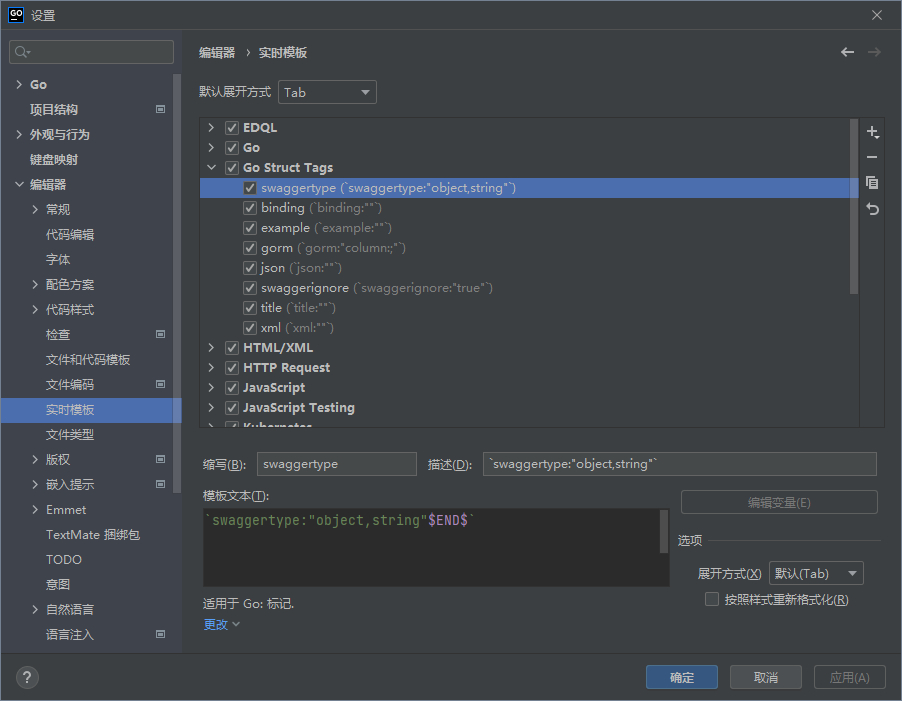
- 打开 GoLand 设置窗口(Windows 快捷键 Ctrl + Alt +S);
- 依次点击 编辑器(Editor) → 实时模板(Live Template) → Go Struct Tags;
- 复制以下代码,右键粘贴(Windows 快捷键 Ctrl + V);
- 点击设置窗口的 确定 按钮,就可以在 Go 结构体标签中自动提示完成相关标签了。
配置代码
<template name="binding" value="`binding:"$END$"`" description="`binding:""`" toReformat="true" toShortenFQNames="true">
<context>
<option name="GO_TAG" value="true" />
</context>
</template>
<template name="example" value="`example:"$END$"`" description="`example:""`" toReformat="true" toShortenFQNames="true">
<context>
<option name="GO_TAG" value="true" />
</context>
</template>
<template name="gorm" value="`gorm:"column:$FIELD_NAME$;"$END$`" description="`gorm:"column:;"`" toReformat="true" toShortenFQNames="true">
<variable name="FIELD_NAME" expression="snakeCase(fieldName())" defaultValue="" alwaysStopAt="true" />
<context>
<option name="GO_TAG" value="true" />
</context>
</template>
<template name="swaggerignore" value="`swaggerignore:"true"$END$`" description="`swaggerignore:"true"`" toReformat="false" toShortenFQNames="true">
<context>
<option name="GO_TAG" value="true" />
</context>
</template>
<template name="swaggertype" value="`swaggertype:"object,string"$END$`" description="`swaggertype:"object,string"`" toReformat="false" toShortenFQNames="true">
<context>
<option name="GO_TAG" value="true" />
</context>
</template>
<template name="title" value="`title:"$END$"`" description="`title:""`" toReformat="true" toShortenFQNames="true">
<context>
<option name="GO_TAG" value="true" />
</context>
</template>
| 内容声明 | |
|---|---|
| 标题: GoLand 自定义 Go 结构体标签实时模板 | |
| 链接: https://zixizixi.cn/goland-editor-live-template-go-struct-tags | 来源: iTanken |
本作品采用知识共享署名-相同方式共享 4.0 国际许可协议进行许可,转载请保留此声明。
| |